Showing posts with label Tips and Trick. Show all posts
Why this is important?

Forums are all over the web. Some questions, get answer, some just neglected at all and the problem is you don't know the reasons. You know how to ask questions at the right time and in the right place just isn't enough when asking a question in forums, but it should be followed by the proper way so that interested forum members read it and answer the questions.


My first experience when ask something that mainly related to electronics forums made me realize something. It needs a few key points to get answered in a forum. The thread I created had a response a bit because I didn't figure out in advance.

Have you ever neglected in a forum when asking a question and no one answers it? Pissed Off? Actually, there are certain rules, procedures and reasons to do so. We cannot hope to instantly get the correct answer that quickly.

Members of the forum that you visit might be a busy man/woman so they didn't get to see all the threads and ignore the perceived less important questions.
We have to apply below steps before asking the questions in the forum. So are you ready?

Here is the reasons you didn't get answer in forum:


1. Make sure the answer of questions you are going to ask are not on the web or if the asnwers are on the web like Google, there may be technical or language barriers that are less understood. Try using Google Translate to translate it. If the results of translating less satisfying, try to explain clearly and fully in your question.

2. Try looking for a guide on your question, just maybe there's a manual somewhere.

3. Be sure to read the FAQ (Frequently Asked Questions) before ask and do a search in the forum. If the question was not asked on the forum you can ask it directly with a new thread.

4. Do a thorough search on Google or other search engines such as Yahoo to research these questions. Don't make yourself look ignorance and just want to get a rapid and easy answer without doing nothing.

5. We can do a discussion or ask a friend with email or mailing list, maybe they could give the answer.

6. At the time of the answer you're looking for is still not obtained after all efforts that said above, create a thread about your questions and explain in detail what we have done and the results we get.

7. Use a clear and bright picture if you would like to inquire about specific parts of the picture, do not use a camera that can't deliver maximum results in our picture.

The last thing might sound funny because my English is any less good, but needs to be emphasized when asking a question is try to make grammar, spelling and punctuation were rendered correctly.
Do your best even though our native language we're not English. Once you ask a question in the forum, don't be in a hurry to get the answer. Not everyone has a lot of free time.

I've seen someone make a question with multiple threads at the same time, they are impatient and want to get the answer immediately, of course this is not allowed. That's likely irritating people.

Learn about the forum that we entered. If you sign in to a television technician forum, do not make a thread title like "I NEED HELP!"or "PLEASE HELP ME!" Don't blame me if no one answered you.

In some forums there are provisions to include the name and model of the device you're question. Do with specific and clearly as "LG Flatron LCD Monitor Model L178WSS Shutdown Intermittenly". Just sit down sweetly and I'm sure this question will be answered within a relative short time.

Note the sentence do you use when used to designate a component, do not use words such as "That big capacitor". Better to use a more specific wording and details like "One capacitor 2200uF on + 5V trace"

Open minded and making it clear that you are able and willing to help in the process of developing the solution for yourself. When they suggest to read the manual or datasheet, do and give follow-up question if there are still less understood. Lastly, do what you need to do first before asking a question.

This article is not limited to electronics forums only, we can use the basic guidelines in this article to other forums so we can get answered in forum immediately. Don't forget to read how to use light bulb trick.

Have fun and thanks for coming here.


Why this is important?

Forums are all over the web. Some questions, get answer, some just neglected at all and the problem is you don't know the reasons. You know how to ask questions at the right time and in the right place just isn't enough when asking a question in forums, but it should be followed by the proper way so that interested forum members read it and answer the questions.


My first experience when ask something that mainly related to electronics forums made me realize something. It needs a few key points to get answered in a forum. The thread I created had a response a bit because I didn't figure out in advance.

Have you ever neglected in a forum when asking a question and no one answers it? Pissed Off? Actually, there are certain rules, procedures and reasons to do so. We cannot hope to instantly get the correct answer that quickly.

Members of the forum that you visit might be a busy man/woman so they didn't get to see all the threads and ignore the perceived less important questions.
We have to apply below steps before asking the questions in the forum. So are you ready?

Here is the reasons you didn't get answer in forum:


1. Make sure the answer of questions you are going to ask are not on the web or if the asnwers are on the web like Google, there may be technical or language barriers that are less understood. Try using Google Translate to translate it. If the results of translating less satisfying, try to explain clearly and fully in your question.

2. Try looking for a guide on your question, just maybe there's a manual somewhere.

3. Be sure to read the FAQ (Frequently Asked Questions) before ask and do a search in the forum. If the question was not asked on the forum you can ask it directly with a new thread.

4. Do a thorough search on Google or other search engines such as Yahoo to research these questions. Don't make yourself look ignorance and just want to get a rapid and easy answer without doing nothing.

5. We can do a discussion or ask a friend with email or mailing list, maybe they could give the answer.

6. At the time of the answer you're looking for is still not obtained after all efforts that said above, create a thread about your questions and explain in detail what we have done and the results we get.

7. Use a clear and bright picture if you would like to inquire about specific parts of the picture, do not use a camera that can't deliver maximum results in our picture.

The last thing might sound funny because my English is any less good, but needs to be emphasized when asking a question is try to make grammar, spelling and punctuation were rendered correctly.
Do your best even though our native language we're not English. Once you ask a question in the forum, don't be in a hurry to get the answer. Not everyone has a lot of free time.

I've seen someone make a question with multiple threads at the same time, they are impatient and want to get the answer immediately, of course this is not allowed. That's likely irritating people.

Learn about the forum that we entered. If you sign in to a television technician forum, do not make a thread title like "I NEED HELP!"or "PLEASE HELP ME!" Don't blame me if no one answered you.

In some forums there are provisions to include the name and model of the device you're question. Do with specific and clearly as "LG Flatron LCD Monitor Model L178WSS Shutdown Intermittenly". Just sit down sweetly and I'm sure this question will be answered within a relative short time.

Note the sentence do you use when used to designate a component, do not use words such as "That big capacitor". Better to use a more specific wording and details like "One capacitor 2200uF on + 5V trace"

Open minded and making it clear that you are able and willing to help in the process of developing the solution for yourself. When they suggest to read the manual or datasheet, do and give follow-up question if there are still less understood. Lastly, do what you need to do first before asking a question.

This article is not limited to electronics forums only, we can use the basic guidelines in this article to other forums so we can get answered in forum immediately. Don't forget to read how to use light bulb trick.

Have fun and thanks for coming here.


Many people may already know what is light bulb trick if you haven't; please read and apply this on your repair bench to overcome headaches during the repair electronic equipment. Fixing electronic equipment was very fun and rewarding, especially if we have a hobby in the field of electronics. Do not be surprised if there are people who become successful in repair work.

As a repairer, we must always read and read. Why do I say it twice? Because from reading our knowledge of the field that had sharpened and professionally. From a few references and a friend, I think the safest thing and good for preventing our mistakes in the repair are to use light bulb trick, imagine if you forget to check one of the damaged components that shorted.  


The scary thing that may happen to the electronic equipment is going to explode or catch fire, and of course, it is so insidious, so from now on making it a habit to always use a light bulb trick when repair power supply that has a short circuit. This trick actually has long been practiced by a professional repairer in times past. This continues because of the undeniable existence of this tool is very useful.

The bulb is used an incandescent bulb, do not use a fluorescent bulb because that is not appropriate. These tricks work because the light bulb is a nonlinear component. What it means is not linear? The resistance of the bulb will change according to the temperature at the bulb. If the temperature at the bulb rises, the resistance of the bulb will progressively increase and vice versa. 
This is the underlying use of the bulb to prevent components that have replaced to
broken back if there are still missing by us. How to set it up? It is not difficult. I am going to draw its schema for your better understand. 
Light Bulb Trick Use

We can see that the mains AC supply voltage line that has two lines Live and Neutral. Fuse is usually mounted on the Live line to prevent fires in the event of a short circuit on the electronic device because its function is to disconnect the device automatically when the current that flows is too large. It can be seen that the diode 4 serves as a diode rectifier. You can see mine below.


How to Use Light Bulb Trick

How to setup is fairly easy where we simply plug bulb into the feet of fuse, while the fuse is detachable. When a component in a device damaged shorted, then the bulb will light up brightly. In other words, if the light bulb does not light up when connected to the mains supply means a short circuit does not occur again.
In fact, it is more practical if we directly use a lamp connected to the socket and we connect devices that are ready to be fixed into the socket and the socket of the lamp is connected to the mains supply. That is up to you and have fun! Thanks for coming here. 

Many people may already know what is light bulb trick if you haven't; please read and apply this on your repair bench to overcome headaches during the repair electronic equipment. Fixing electronic equipment was very fun and rewarding, especially if we have a hobby in the field of electronics. Do not be surprised if there are people who become successful in repair work.

As a repairer, we must always read and read. Why do I say it twice? Because from reading our knowledge of the field that had sharpened and professionally. From a few references and a friend, I think the safest thing and good for preventing our mistakes in the repair are to use light bulb trick, imagine if you forget to check one of the damaged components that shorted.  


The scary thing that may happen to the electronic equipment is going to explode or catch fire, and of course, it is so insidious, so from now on making it a habit to always use a light bulb trick when repair power supply that has a short circuit. This trick actually has long been practiced by a professional repairer in times past. This continues because of the undeniable existence of this tool is very useful.

The bulb is used an incandescent bulb, do not use a fluorescent bulb because that is not appropriate. These tricks work because the light bulb is a nonlinear component. What it means is not linear? The resistance of the bulb will change according to the temperature at the bulb. If the temperature at the bulb rises, the resistance of the bulb will progressively increase and vice versa. 
This is the underlying use of the bulb to prevent components that have replaced to
broken back if there are still missing by us. How to set it up? It is not difficult. I am going to draw its schema for your better understand. 
Light Bulb Trick Use

We can see that the mains AC supply voltage line that has two lines Live and Neutral. Fuse is usually mounted on the Live line to prevent fires in the event of a short circuit on the electronic device because its function is to disconnect the device automatically when the current that flows is too large. It can be seen that the diode 4 serves as a diode rectifier. You can see mine below.


How to Use Light Bulb Trick

How to setup is fairly easy where we simply plug bulb into the feet of fuse, while the fuse is detachable. When a component in a device damaged shorted, then the bulb will light up brightly. In other words, if the light bulb does not light up when connected to the mains supply means a short circuit does not occur again.
In fact, it is more practical if we directly use a lamp connected to the socket and we connect devices that are ready to be fixed into the socket and the socket of the lamp is connected to the mains supply. That is up to you and have fun! Thanks for coming here. 


If you know how to test remote control, it will make your job easier; especially if you are on TV or Monitor repairing. Remote control is really cheap today. You can get “multi” remote control even just for 3 bucks in my country. There is “multi” remote control recently available in the market, which could be set to multiple device’s model and type. It means you could use one remote control for one type devices, but has different brand and code number e.g. Toshiba, Polytron, or Panasonic TV. 


Test TV Remote Control
Picture from Wikipedia

As Wikipedia said about Remote Control :
A remote control is a component of an electronics device—most commonly a television set, DVD player, or home theater system—originally used for operating the device wirelessly from a short line-of-sight distance. Remote control has continually evolved and advanced over recent years to include Bluetooth connectivity, motion sensor-enabled capabilities and voice control 

It seems not worth to repair remote control this day, regardless it could be fixed with just a few components. Since the remote control use infra red to transmit the signal, our eyes couldn’t see it and how to know it still functions?

Easy, you don’t need super heavy or expensive tool to test it. You just need a simple camera on your phone. How? You can see on the top of your remote control has a little “led”. Turn this "led" towards to the camera, when you press any button on your remote control, you will notice the “led” is lit. Faulty remote wouldn’t lit the “led”. When I am not press the button yet the "led" doesn't lit.
How to Test TV Remote Control
Look below picture when I pressed the button.
How to Test Remote Control
Of course you can build a circuit to test your remote control, but why to bother with that if we have a phone with us everyday and every time. 

I assume you know the trick now; I want to let you know a little tips to repair remote control yourself. Most of the times, the failure of remote control just a dirty contact, you can see the rubber inside your remote control has a little black circle. Clean it if you find the remote control function intermittently. If this didn’t fix your problem, you have to call an engineer!


Okay, just kidding. No need such an engineer skill to fix it. Now see your battery case in remote control, there are metal contact to make a connection to your battery. If the spring and metal has corroded, you could clean it with sandpaper and rub it with a little Vaseline to prevent it corroded again.

Thanks for coming here.


If you know how to test remote control, it will make your job easier; especially if you are on TV or Monitor repairing. Remote control is really cheap today. You can get “multi” remote control even just for 3 bucks in my country. There is “multi” remote control recently available in the market, which could be set to multiple device’s model and type. It means you could use one remote control for one type devices, but has different brand and code number e.g. Toshiba, Polytron, or Panasonic TV. 


Test TV Remote Control
Picture from Wikipedia

As Wikipedia said about Remote Control :
A remote control is a component of an electronics device—most commonly a television set, DVD player, or home theater system—originally used for operating the device wirelessly from a short line-of-sight distance. Remote control has continually evolved and advanced over recent years to include Bluetooth connectivity, motion sensor-enabled capabilities and voice control 

It seems not worth to repair remote control this day, regardless it could be fixed with just a few components. Since the remote control use infra red to transmit the signal, our eyes couldn’t see it and how to know it still functions?

Easy, you don’t need super heavy or expensive tool to test it. You just need a simple camera on your phone. How? You can see on the top of your remote control has a little “led”. Turn this "led" towards to the camera, when you press any button on your remote control, you will notice the “led” is lit. Faulty remote wouldn’t lit the “led”. When I am not press the button yet the "led" doesn't lit.
How to Test TV Remote Control
Look below picture when I pressed the button.
How to Test Remote Control
Of course you can build a circuit to test your remote control, but why to bother with that if we have a phone with us everyday and every time. 

I assume you know the trick now; I want to let you know a little tips to repair remote control yourself. Most of the times, the failure of remote control just a dirty contact, you can see the rubber inside your remote control has a little black circle. Clean it if you find the remote control function intermittently. If this didn’t fix your problem, you have to call an engineer!


Okay, just kidding. No need such an engineer skill to fix it. Now see your battery case in remote control, there are metal contact to make a connection to your battery. If the spring and metal has corroded, you could clean it with sandpaper and rub it with a little Vaseline to prevent it corroded again.

Thanks for coming here.

In our daily life, we have seen many things that adopt electronics as a basic concept. We could see it in our home like televisions, listening music from a CD player or DVD player, listening radio, or just communicating by phone. We could find a computer in the office, print letter with a printer or just send a facsimile with a fax machine. There are many devices which still have correlations with electronics; even we could see an advertisement board blinks LEDs from the top of the store. From all of the example, we can conclude our life is fully depending on the electronics device. 
Basic Electronic
Picture from Wikipedia

You can imagine what will happen if an electronics device misses from our daily life. We may need to walk from one place to another place just for meeting someone, or we couldn’t use the device which is in front of us now, yes computer. When talking about electronics, it really helps us with different things in our life. We can get better life from that. The most important is we must always get an update and expand the knowledge so we can make better devices to make our days easier.

It was discovered centuries ago about basic electricity when some of the materials will attract one each other after being rubbed together. Actually, electricity is an electron that continuously moves through the wires that still have conjunction with voltage and current, but today we can find many circuits is wireless. That is something can’t easily explain with just a few words. The large revolution started at around 1948 years, which is this device name, is a transistor that makes possible to design a circuit with such a small size. Before 1948, there are many people still using vacuum tube which consumes electricity much. After 10 years transistor was found, there is an integrated new device found again name as IC (Integrated Circuit). This IC itself contains many transistors and other compact components inside.

After that happened, we could see another new device appeared increasingly fast. That has caused by Silicon as a base material for transistor and IC. As a base knowledge, there are two components for electronics:
1.       Passive Components
2.       Active Component

To make an electronic circuit, we need some tools like pliers, screwdriver, drill, solder, soldering iron, etc. We need a material to attach the components as well as a PCB or just a breadboard. As a matter of fact, the circuit will never work if nothing to energize it. We need a supply source such as a battery. The first important formula that needs to know is Ohm’s Law. This formula was found by George Simon Ohm from Germany, he found relations about potential energy when electrons move from one point to another particular point. They are another Kirchhoff’s Law to bear in mind; you have to learn this as this makes a foundation for your further progress.

As we progress, we need to handle such a high voltage and because electricity is dangerous we have to make sure our safety first. As a basic, you should need what is Hot, Neutral and Ground terms. Depth of knowledge about these terms makes us more safety when dealing with electricity. Electronics is our friend when we could use it wisely, but it could bite and kill you if you make some mistake. Want to learn to build safety tools? See this Isolation Transformer.

In our daily life, we have seen many things that adopt electronics as a basic concept. We could see it in our home like televisions, listening music from a CD player or DVD player, listening radio, or just communicating by phone. We could find a computer in the office, print letter with a printer or just send a facsimile with a fax machine. There are many devices which still have correlations with electronics; even we could see an advertisement board blinks LEDs from the top of the store. From all of the example, we can conclude our life is fully depending on the electronics device. 
Basic Electronic
Picture from Wikipedia

You can imagine what will happen if an electronics device misses from our daily life. We may need to walk from one place to another place just for meeting someone, or we couldn’t use the device which is in front of us now, yes computer. When talking about electronics, it really helps us with different things in our life. We can get better life from that. The most important is we must always get an update and expand the knowledge so we can make better devices to make our days easier.

It was discovered centuries ago about basic electricity when some of the materials will attract one each other after being rubbed together. Actually, electricity is an electron that continuously moves through the wires that still have conjunction with voltage and current, but today we can find many circuits is wireless. That is something can’t easily explain with just a few words. The large revolution started at around 1948 years, which is this device name, is a transistor that makes possible to design a circuit with such a small size. Before 1948, there are many people still using vacuum tube which consumes electricity much. After 10 years transistor was found, there is an integrated new device found again name as IC (Integrated Circuit). This IC itself contains many transistors and other compact components inside.

After that happened, we could see another new device appeared increasingly fast. That has caused by Silicon as a base material for transistor and IC. As a base knowledge, there are two components for electronics:
1.       Passive Components
2.       Active Component

To make an electronic circuit, we need some tools like pliers, screwdriver, drill, solder, soldering iron, etc. We need a material to attach the components as well as a PCB or just a breadboard. As a matter of fact, the circuit will never work if nothing to energize it. We need a supply source such as a battery. The first important formula that needs to know is Ohm’s Law. This formula was found by George Simon Ohm from Germany, he found relations about potential energy when electrons move from one point to another particular point. They are another Kirchhoff’s Law to bear in mind; you have to learn this as this makes a foundation for your further progress.

As we progress, we need to handle such a high voltage and because electricity is dangerous we have to make sure our safety first. As a basic, you should need what is Hot, Neutral and Ground terms. Depth of knowledge about these terms makes us more safety when dealing with electricity. Electronics is our friend when we could use it wisely, but it could bite and kill you if you make some mistake. Want to learn to build safety tools? See this Isolation Transformer.


In the world of electronics equipment repair, we always see power supply in almost all equipment. It is like a heart for a human being because you cannot turn on the device without power supply. Regardless the type of power supply is used, there is two major power supply type in the market i.e. Linear Power Supply and Switch Mode Power Supply (SMPS). 

The Linear Power Supply identical with a big bulky transformer and heavy since SMPS lighter and more efficient. It is not a hard job to define the primary and secondary winding of Linear Power Supply because most of it has a label written clearly on each wire. That is not a same case for SMPS because it has many designs out there. Most of step-up SMPS has many secondary winding and it is hard to identify which is which.


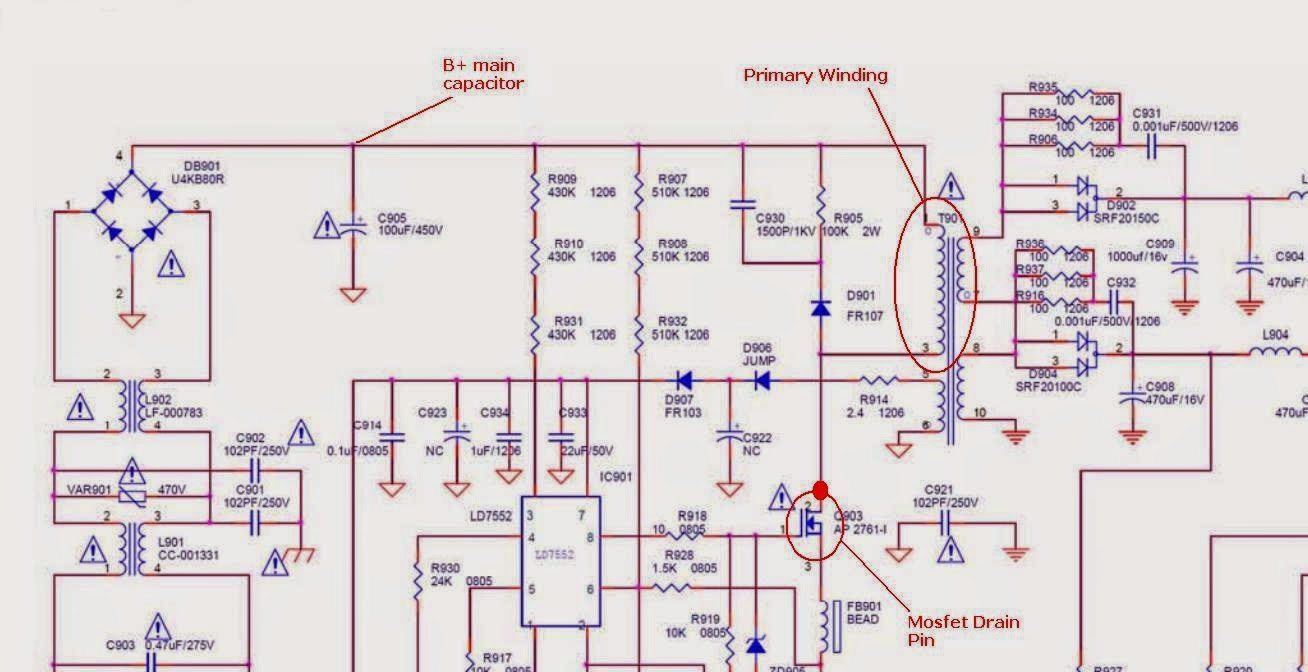
Here I will share a little trick to identify the primary winding of the SMPS transformer. It is easy if you know the trick. You can use this trick in any SMPS circuit to make your troubleshooting job easier. The tool needed to check if primary winding still good or not is Ring Tester. The first thing to look for:

B+ supply of Main Capacitor
You can trace this line from the positive side main capacitor; it is usually 22-100uF/450V. You can move forward to find one of the transformer pins.

How to Find SMPS Transformer Primary Winding
Because you are looking for primary winding, just ignore other 3 components (C930, R905, D901) beside the primary winding. That is a safety circuit to save the FET/Transistor from spike voltage.

     Drain (Collector) pins of Mosfet / Transistor 
    You can trace the second primary winding by finding Drain/Collector pins from the power Mosfet or Transistor. It leads to one of SMPS transformer pins which is the primary winding of a transformer. I mark it with red dot as clear as I can. So the primary winding number in the schematic picture I provided is 0 and 3.

For secondary winding, it is a little complicated than primary winding. The method I always use traces the line back from secondary diode as you can see from above picture there are two secondary Schottky diode D902 and D904. If you are interested to repair ATX power supply, this trick could help the repair job easier. Now you can find primary winding of SMPS transformer from any electronics equipment used it. Thanks for coming here.


In the world of electronics equipment repair, we always see power supply in almost all equipment. It is like a heart for a human being because you cannot turn on the device without power supply. Regardless the type of power supply is used, there is two major power supply type in the market i.e. Linear Power Supply and Switch Mode Power Supply (SMPS). 

The Linear Power Supply identical with a big bulky transformer and heavy since SMPS lighter and more efficient. It is not a hard job to define the primary and secondary winding of Linear Power Supply because most of it has a label written clearly on each wire. That is not a same case for SMPS because it has many designs out there. Most of step-up SMPS has many secondary winding and it is hard to identify which is which.


Here I will share a little trick to identify the primary winding of the SMPS transformer. It is easy if you know the trick. You can use this trick in any SMPS circuit to make your troubleshooting job easier. The tool needed to check if primary winding still good or not is Ring Tester. The first thing to look for:

B+ supply of Main Capacitor
You can trace this line from the positive side main capacitor; it is usually 22-100uF/450V. You can move forward to find one of the transformer pins.

How to Find SMPS Transformer Primary Winding
Because you are looking for primary winding, just ignore other 3 components (C930, R905, D901) beside the primary winding. That is a safety circuit to save the FET/Transistor from spike voltage.

     Drain (Collector) pins of Mosfet / Transistor 
    You can trace the second primary winding by finding Drain/Collector pins from the power Mosfet or Transistor. It leads to one of SMPS transformer pins which is the primary winding of a transformer. I mark it with red dot as clear as I can. So the primary winding number in the schematic picture I provided is 0 and 3.

For secondary winding, it is a little complicated than primary winding. The method I always use traces the line back from secondary diode as you can see from above picture there are two secondary Schottky diode D902 and D904. If you are interested to repair ATX power supply, this trick could help the repair job easier. Now you can find primary winding of SMPS transformer from any electronics equipment used it. Thanks for coming here.


I make a conclusion to hope everybody would get benefit from reading this. As repairer, the first important thing you must know is testing electronic components, nothing you can do if you aren’t capable to test electronic equipment with a right ways. You don’t have always followed others advice, somebody like to use analog multimeter and somebody like to use digital meter. Use whatever meter you feel confident about. 

I am staying with analog meter for some case, and digital meter in some case. If you are not good in testing electronic equipment, the chance is you will miss bad components which you trust it to be good. Yes, I know some components could be faulty under load, but that is rare and another case. You can also buy Mr Jestine Yong book about "Testing Electronics Components".

Please use Isolation Transformer for your safety and your oscilloscope. I said it again in this thread because safety first when you want to repair anything, electricity will bite you if you are careless. You can buy it or just do it yourself. You don’t have to play with electricity; it is such an animal will make a pain in your ass if some mistake existed. I can recall my first time where I touch the fuse and get electrocuted, that is a really bad experience. Trust me. Don’t do a repair job without someone beside you and when you have finished your job, keep the eyes do burn test, don’t ever leave it without someone to see it. It may burn your whole house or your lab.

Sometimes repair electronics would be hard and confusing. It is good to make habits to take a photo of your equipment to make you “remember” where the cables or components need to attach. Bear in mind, if you want to ask question about your circuit in forums, they need a picture too. This will make your life easier and the chance of success to repair your equipment will be higher. If you can’t provide a good picture, nobody will answer your question. The first thing to remember is asking the question politely, don’t type chat messenger’s words such as “I 4m t00, plz, hvn’t”. You can keep my words, nobody will answer that question.


The other thing about the repair is your ability to read schematic diagram, some equipment could be repaired just by simple voltage check, but some equipment needs a complicated service manual to read and this will make your job easier if you know about this. As far as I know, maybe this is a dumb advice because most of the people do repair can read schematic well. Nothing wrong about this, it is better to let you know than just keep this alone.

Have a right equipment to troubleshoot your equipment would be essential; you don’t test capacitor’s ESR with capacitance meter, do you? If you want to test LCD monitor CCFL, you can use CCFL tester. Ah, the last is you have to good in soldering job. Yes that is fundamental if you want to serious about repair or build circuits. SMD components and IC would be hard to solder, but if you learn the right technique, that is not too hard.


I have post a guide to help Troubleshoot LCD TV or Monitor problem. You may want to read it. Thank you.

I make a conclusion to hope everybody would get benefit from reading this. As repairer, the first important thing you must know is testing electronic components, nothing you can do if you aren’t capable to test electronic equipment with a right ways. You don’t have always followed others advice, somebody like to use analog multimeter and somebody like to use digital meter. Use whatever meter you feel confident about. 

I am staying with analog meter for some case, and digital meter in some case. If you are not good in testing electronic equipment, the chance is you will miss bad components which you trust it to be good. Yes, I know some components could be faulty under load, but that is rare and another case. You can also buy Mr Jestine Yong book about "Testing Electronics Components".

Please use Isolation Transformer for your safety and your oscilloscope. I said it again in this thread because safety first when you want to repair anything, electricity will bite you if you are careless. You can buy it or just do it yourself. You don’t have to play with electricity; it is such an animal will make a pain in your ass if some mistake existed. I can recall my first time where I touch the fuse and get electrocuted, that is a really bad experience. Trust me. Don’t do a repair job without someone beside you and when you have finished your job, keep the eyes do burn test, don’t ever leave it without someone to see it. It may burn your whole house or your lab.

Sometimes repair electronics would be hard and confusing. It is good to make habits to take a photo of your equipment to make you “remember” where the cables or components need to attach. Bear in mind, if you want to ask question about your circuit in forums, they need a picture too. This will make your life easier and the chance of success to repair your equipment will be higher. If you can’t provide a good picture, nobody will answer your question. The first thing to remember is asking the question politely, don’t type chat messenger’s words such as “I 4m t00, plz, hvn’t”. You can keep my words, nobody will answer that question.


The other thing about the repair is your ability to read schematic diagram, some equipment could be repaired just by simple voltage check, but some equipment needs a complicated service manual to read and this will make your job easier if you know about this. As far as I know, maybe this is a dumb advice because most of the people do repair can read schematic well. Nothing wrong about this, it is better to let you know than just keep this alone.

Have a right equipment to troubleshoot your equipment would be essential; you don’t test capacitor’s ESR with capacitance meter, do you? If you want to test LCD monitor CCFL, you can use CCFL tester. Ah, the last is you have to good in soldering job. Yes that is fundamental if you want to serious about repair or build circuits. SMD components and IC would be hard to solder, but if you learn the right technique, that is not too hard.


I have post a guide to help Troubleshoot LCD TV or Monitor problem. You may want to read it. Thank you.

Regardless, you are new in electronics or expert, we have to search for components suitable to our needs and that is not hard if you are an expert who is usually designed circuit and know where to get your parts without too much effort. Personally, I buy the parts that I needed in my city because I always find what I need there, sometimes when I don’t get the parts for my circuit, I have just ordered it from online via eBay or my country website. I have a friend which always orders the parts via online and sometimes he shares with me about his story, some online store looks good and some didn’t.


This website list that I publish could be your source for getting the components. This entire list base on my friend’s sharing. You can find an idea where to buy your needed components base on your budget, location, or shipping time. Please bear in mind, the shipping time couldn’t be justified just from my friend experiences because most of it depend on our locations, sometimes other’s location have a faster time to arrive.
1.  eBay
You can find as many as you wanted here, not just an electronics part. You can search for another item as well like as camera, bike, boot, clothes, etc. sometimes the seller has a good documentation and knowledge about what they sell, sometimes don’t even know what they sell. Most of item has free shipping fees to attract consumer. Shipping time depends on your location and your options, you can ask the seller for faster shipping service with additional cost.
2.  Digikey
Most of electronic enthusiast likes to order from here. They sell many parts for your need, if you are just starting with electronics, this place is suite you pretty much. One thing to keep in mind, you have to know the components part name to order from here. The prices are cheap, and the shipping time looks good.
3.  Badcaps
If you need really good capacitors for your motherboard or PSU, here is the right place for you. They sell many types good capacitor like Panasonic, Rubycon, Nichicon, etc. The forum existed too, so you can ask the owner or administrator where to find what you want. I thought the part’s cost didn’t expensive; the shipping is depending on your location.
4.  Sparkfun
If you like playing with a microcontroller, maybe this is the best place for you. They have many parts, kits and assembled one. You can buy microcontroller programmer from here, they have many type to choose for. The item’s manual is good, and have a good tutorial about microcontroller. Some circuit is open source which means we could build it our self. The prices look a bit expensive, but really worth your time and money if you search for some custom kits. 
   
There are other sites to find your parts, just take a look with Google. I know other names like as Adafruit, Ladyada, Farnell, Mouser, and Seed Studio etc. You can go to there too. You can make a comparison between them and choose the one suit you much. As said “many roads to Rome”, try different stores too, maybe you’ll find where the best is for you. Do search as much as you can and make a decision about the places to buy, so you’ll happy with it.

Regardless, you are new in electronics or expert, we have to search for components suitable to our needs and that is not hard if you are an expert who is usually designed circuit and know where to get your parts without too much effort. Personally, I buy the parts that I needed in my city because I always find what I need there, sometimes when I don’t get the parts for my circuit, I have just ordered it from online via eBay or my country website. I have a friend which always orders the parts via online and sometimes he shares with me about his story, some online store looks good and some didn’t.


This website list that I publish could be your source for getting the components. This entire list base on my friend’s sharing. You can find an idea where to buy your needed components base on your budget, location, or shipping time. Please bear in mind, the shipping time couldn’t be justified just from my friend experiences because most of it depend on our locations, sometimes other’s location have a faster time to arrive.
1.  eBay
You can find as many as you wanted here, not just an electronics part. You can search for another item as well like as camera, bike, boot, clothes, etc. sometimes the seller has a good documentation and knowledge about what they sell, sometimes don’t even know what they sell. Most of item has free shipping fees to attract consumer. Shipping time depends on your location and your options, you can ask the seller for faster shipping service with additional cost.
2.  Digikey
Most of electronic enthusiast likes to order from here. They sell many parts for your need, if you are just starting with electronics, this place is suite you pretty much. One thing to keep in mind, you have to know the components part name to order from here. The prices are cheap, and the shipping time looks good.
3.  Badcaps
If you need really good capacitors for your motherboard or PSU, here is the right place for you. They sell many types good capacitor like Panasonic, Rubycon, Nichicon, etc. The forum existed too, so you can ask the owner or administrator where to find what you want. I thought the part’s cost didn’t expensive; the shipping is depending on your location.
4.  Sparkfun
If you like playing with a microcontroller, maybe this is the best place for you. They have many parts, kits and assembled one. You can buy microcontroller programmer from here, they have many type to choose for. The item’s manual is good, and have a good tutorial about microcontroller. Some circuit is open source which means we could build it our self. The prices look a bit expensive, but really worth your time and money if you search for some custom kits. 
   
There are other sites to find your parts, just take a look with Google. I know other names like as Adafruit, Ladyada, Farnell, Mouser, and Seed Studio etc. You can go to there too. You can make a comparison between them and choose the one suit you much. As said “many roads to Rome”, try different stores too, maybe you’ll find where the best is for you. Do search as much as you can and make a decision about the places to buy, so you’ll happy with it.

Sometimes we just build a circuit that uses battery power supply. This is true when we deal like microcontroller circuit or kits, but sometimes we need to deal with high voltage circuitry likes AC lamp dimmer, flyback, power supply circuit. Actually, DC circuit is more dangerous than AC circuit, and what item that we needed for our safety? Of course Isolation Transformer, please don’t miss this as you are electronic enthusiast, especially when you are probing with your oscilloscope probes. You have a chance to damage your oscilloscope if you don’t use an isolation transformer. No matter you are repairer, home brewer, or just a hobbyist like to building kits. 


We can make simple deductions from it’s name “isolation”. Yes, this thing makes us isolated from the mains supply so we could protect when touch something wrong on our circuit. One note to remember, this Isolation transformer didn’t protect us when we touch two sources from mains supply like as Live and Neutral together. We just protected if we touch one of the source from mains supply. Yes, I said one of the source from mains supply. Why? Usually when we touch Live line in power supply and our feet still on earth / ground we could get an electrocuted because our body makes direct connection to Neutral line. You can get a deep explained about this at allaboutcircuits.com lesson books first chapter about safety precautions.

As repairer, sometimes I need to do voltage testing to fasten my job. I can’t avoid this because voltage testing method really saves time and useful. You can see from below picture if you have a spare transformer on your bench and want to build it yourself. You just need two transformers which have same voltage rating on it’s secondary. 
Please don’t connect mains ground with transformer output ground TRAN2, it needs to isolated from you. Two transformers which I name TRAN1 and TRAN2 could be any transformer, but if you concern about electronic equipments wattage which could be powered from this isolation transformer, you have to use big enough VA rating for the transformer. CMIIW, I think 100VA more than enough for home consumer equipments like a TV, radio, monitor and etc. Enthusiast about this electronic thing make me think safety first when do repair or other electronics job because it would kill me if I care less. Thank you for coming here.


Sometimes we just build a circuit that uses battery power supply. This is true when we deal like microcontroller circuit or kits, but sometimes we need to deal with high voltage circuitry likes AC lamp dimmer, flyback, power supply circuit. Actually, DC circuit is more dangerous than AC circuit, and what item that we needed for our safety? Of course Isolation Transformer, please don’t miss this as you are electronic enthusiast, especially when you are probing with your oscilloscope probes. You have a chance to damage your oscilloscope if you don’t use an isolation transformer. No matter you are repairer, home brewer, or just a hobbyist like to building kits. 


We can make simple deductions from it’s name “isolation”. Yes, this thing makes us isolated from the mains supply so we could protect when touch something wrong on our circuit. One note to remember, this Isolation transformer didn’t protect us when we touch two sources from mains supply like as Live and Neutral together. We just protected if we touch one of the source from mains supply. Yes, I said one of the source from mains supply. Why? Usually when we touch Live line in power supply and our feet still on earth / ground we could get an electrocuted because our body makes direct connection to Neutral line. You can get a deep explained about this at allaboutcircuits.com lesson books first chapter about safety precautions.

As repairer, sometimes I need to do voltage testing to fasten my job. I can’t avoid this because voltage testing method really saves time and useful. You can see from below picture if you have a spare transformer on your bench and want to build it yourself. You just need two transformers which have same voltage rating on it’s secondary. 
Please don’t connect mains ground with transformer output ground TRAN2, it needs to isolated from you. Two transformers which I name TRAN1 and TRAN2 could be any transformer, but if you concern about electronic equipments wattage which could be powered from this isolation transformer, you have to use big enough VA rating for the transformer. CMIIW, I think 100VA more than enough for home consumer equipments like a TV, radio, monitor and etc. Enthusiast about this electronic thing make me think safety first when do repair or other electronics job because it would kill me if I care less. Thank you for coming here.


Did you ever want to search schematic description over the search engines like Google? or did you just get an image from your friends and you didn't know where is it come from? Relax...I'll show how to search with image on Google search engine. I explain it with images to make you understand it clearly.

First step, open your google search engine and click image, when your browser show like below picture just click the camera symbol where I marked with a red sign.
 After that, you'll see like below picture.

Click on Upload an Image like below picture. I added my own file which is named as dl2tm.gif. You can add another file using Paste Image URL if you know the site address.

And you are ready to read your results which are more likely match your requirement.
Have fun building or repairing electronics, thank you for coming here.

Did you ever want to search schematic description over the search engines like Google? or did you just get an image from your friends and you didn't know where is it come from? Relax...I'll show how to search with image on Google search engine. I explain it with images to make you understand it clearly.

First step, open your google search engine and click image, when your browser show like below picture just click the camera symbol where I marked with a red sign.
 After that, you'll see like below picture.

Click on Upload an Image like below picture. I added my own file which is named as dl2tm.gif. You can add another file using Paste Image URL if you know the site address.

And you are ready to read your results which are more likely match your requirement.
Have fun building or repairing electronics, thank you for coming here.